
CarShots for iPhone
Guided car photo capture on your phone
On-screen guides show exactly where to stand for every angle, so anyone on your team can shoot a car the right way.
On Android? Capture works the same way in your phone's browser.
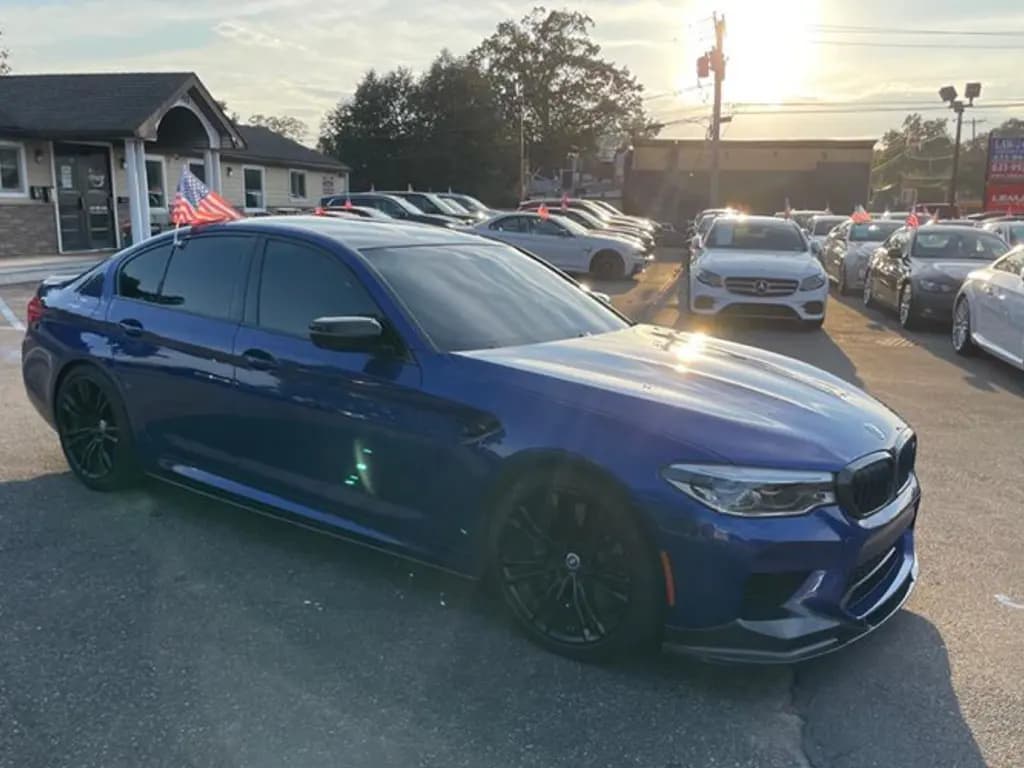
 Front angle · 1 of 8
Stand at the front corner on the driver side. Get the whole car in.
Every angle, every time
The guided shot list covers the outside angles, the interior and the details. Each outside angle has an outline on screen, so you know where to stand and how much of the car to fit in.
Capture asks you to turn the phone sideways for the outside shots, so every car comes out in the same landscape frame.
Outside
- Front angle
- Driver side
- Rear angle
- Rear
- Passenger rear
- Passenger side
- Passenger front
- Front
Inside
- Dashboard
- Driver seat
- Back seats
- Trunk
Details
- Wheel
- Odometer
Shoot, then forget it
Photos upload while you move to the next angle, and each one comes back on your backdrop in about 20 seconds. Nobody has to wait at a desk for the edits.
Already have photos? Upload them from your camera roll instead. Download one photo or the whole car as a zip when you're ready to post.
Uploads run while you shoot
- Front angleDone
- Driver sideDone
- Rear angleWorking
- RearUploading
App questions
Is the app free?
The app is free to download. Photos come from your CarShots plan: $50 a month for 333 photos, with a 7-day trial that includes 20 photos and a 360° video.
Is there an Android app?
Not yet. On Android, open CarShots in your phone's browser: capture works the same way, with the same on-screen guides.
Keep reading
- The car photo booth alternative for dealershipsGet photo booth results without buying a booth. Shoot each car on a phone and CarShots puts it in a clean studio background in about a minute.
- Change the background of any car photoRemove and replace car photo backgrounds in seconds. Studio, showroom, or white backgrounds with realistic shadows, reflections, and wheels. Try it free.
- Simple pricing for dealer-quality car photosStart with a free trial, then one simple monthly plan with photos included. No hardware, no photographer, and no long contract.
- CarShots vs SpyneComparing Spyne and CarShots for dealer car photos: image quality, turnaround time, pricing, and setup. See which one fits your lot.
- CarShots vs Dealer Image ProComparing Dealer Image Pro and CarShots for dealer car photos: image quality, turnaround time, pricing, and setup. See which one fits your lot.
Studio-quality photos of every car, from your phone
Try it on one of your own cars, free and without signing up. When you're ready, the 7-day trial includes 20 photos and a 360° video.