


On this page
- Table of Contents
- The Internet Sales Workflow at a Glance
- Why Shoppers Now Expect to Start Deals Online
- Merchandising Listings Built for Online Shoppers
- Routing and Responding to Online Inquiries
- Carrying Online Work Into the Showroom
- Measuring Internet Sales by Funnel Stage
- Confirm the Handoff Before Your Next Sales Push
It's a Tuesday afternoon and a customer walks in holding a phone. Two nights earlier they valued their trade, ran a payment on a specific SUV and booked a 3pm visit. The salesperson pulls up the record and finds a name, a mobile number and a stock number; the trade mileage, the term they were quoted and the car they compared it against are nowhere the desk can see. So the customer starts over, in a chair, with a coffee.
That scene, not the website, is where most car dealership internet sales programs leak money. The listing page did its job. The payment tool did its job. What failed was the twenty minutes after the shopper stopped typing and walked through the door.
Treat that handoff as the operational centre of the job and the rest organises itself. Every stage exists to pass a usable record to the next one, and a store's internet sales performance is best judged by how much work the customer never has to do twice.
Table of Contents
- The Internet Sales Workflow at a Glance
- Why Shoppers Now Expect to Start Deals Online
- Merchandising Listings Built for Online Shoppers
- Routing and Responding to Online Inquiries
- Carrying Online Work Into the Showroom
- Measuring Internet Sales by Funnel Stage
- Confirm the Handoff Before Your Next Sales Push
The Internet Sales Workflow at a Glance
Internet sales workflow stages, owners and metrics
| Stage | What Happens | Usual Owner | Metric to Track |
|---|---|---|---|
| Vehicle merchandising | Photos, specs, pricing and fees go live on the listing | Merchandising or marketing team | Listing views per vehicle |
| Shopper inquiry | Shopper submits a lead, text or chat request | Internet manager | Lead volume by source |
| Lead response | Staff reply with the requested car and one question | Sales or BDC team | Response time |
| Online tools | Shopper uses payment, trade-in or credit tools | Internet manager | Tool completion rate |
| Appointment | Shopper books a visit with context attached | Sales manager | Appointment show rate |
| Showroom handoff | Staff continue the deal from the online record | Sales team | Repeat-step complaints |
| Sale and follow-up | Deal closes and post-sale contact begins | Sales and F&I | Sold-unit rate and gross per deal |
Read left to right and it looks like a straight line. It isn't. A shopper can run a payment estimate, go quiet for four days, then return through a different marketplace with a brand-new inquiry, and the store now holds two records for one buyer who thinks they're running one process.
Each row passes something forward. Merchandising passes a stock number and a price. An inquiry passes a requested vehicle. An appointment passes a time, a name and a trade value. When any of those arrives at the next owner as a blank field, the customer re-enters the information and the digital work is wasted.
That's why the owner column matters more than the stage column. Failures rarely open inside a stage. They open between two of them: merchandising posts a fee the sales desk has never seen, the BDC books a visit without recording that a trade was valued, the floor quotes a payment the internet manager already sent in writing.
Practical rule: whoever owns the next stage should be able to see what the previous stage recorded before they make contact.
Trace One Vehicle Through Every Row
Pick one car on your lot, preferably a used unit with decent traffic. Open its listing, then follow that specific stock number through the CRM, the BDC log, the appointment calendar and the closed deal file. At every row, ask two questions: what information exists here, and can the next owner see it without asking the customer?
The first row where the trail goes cold is the stage to fix. It's almost always cheaper to repair than the marketing line item that generated the traffic.
Why Shoppers Now Expect to Start Deals Online
Internet sales began as a form. A shopper searched inventory, asked for a price, maybe requested an appointment, and the store's job was converting a name into a visit. That definition is now too narrow, because the same shopper can value a trade, run a payment, prequalify for credit and prepare documents without speaking to a person at any point.
The expectations have shifted with the tools. Cox Automotive's 2024 Digitization of Automotive Retail study found that 65% of shoppers wanted to complete most or all purchase steps online, and 85% agreed that digital retailing improves the buying process.
Dealers feel the pull from the other direction. In the same study, 69% of dealers said customers were driving adoption of digital tools, while 97% said customers frequently repeat steps in the dealership that they had already completed online. Both things are true at once: shoppers want the digital path, and the store keeps restarting it.
Most purchases still finish in a building, which is why online work pre-processes the sale rather than replacing the store. Cox Automotive's 2024 Car Buyer Journey Study found that buyers who completed key tasks online, such as applying for credit or pre-filling paperwork, saved an average of 42 minutes at the dealership, with savings of 49 minutes for new-vehicle buyers and 40 minutes for used-vehicle buyers.
So the expectations are specific rather than vague. Accurate vehicle information. Photos a shopper can evaluate. A price with the fees attached. And progress that survives the trip from a marketplace or a dealership website into the showroom. A store that delivers three of those four and loses the fourth at the door has spent real money creating a disappointment.
Merchandising Listings Built for Online Shoppers
Most listing decisions get made in the first screen of a phone. A shopper scrolling inventory can't smell the car, hear the engine or walk the lot, so the photo, the price and the first few lines of specification do all the persuading.

That's the conversation the listing has to survive, and it starts long before anyone sits down.
The Listing Elements in Reading Order
- Photos. Exterior angles, interior, details, shot on the same backdrop with the same lighting so lot clutter doesn't vary from car to car. A guided shot list on a phone, walking around the vehicle at eight exterior angles plus interiors and details, keeps two different staff members producing comparable images. That discipline is the backbone of any repeatable vehicle photography workflow.
- Price and every fee. State the price, then itemise each charge and label any add-on as an add-on. A number that appears for the first time at the desk isn't a pricing strategy, it's a trust problem.
- Vehicle identity. VIN, trim, mileage, options and honest condition notes. The buyer comparing three similar SUVs is doing it on these fields.
- The window sticker or spec sheet, labelled by source. Say whether the equipment list came from the automaker, a spec sheet or your own upload, so shoppers know which data is verified.
- The FTC Buyers Guide on every used unit. It answers the warranty question before anyone has to ask it.
- A walkaround video where you produce one. Even a short clip assembled from stills gives a remote shopper a sense of the car that photographs alone can't.
- Location and one clear contact route. City, hours and a single obvious way to ask a question.
Why Consistency Beats One Great Photo
One beautiful shot followed by nine crooked ones tells a shopper the store is disorganised, and they'll assume the paperwork is too. Consistency across inventory does something a single hero image can't: it signals a process, which is exactly what a buyer about to spend an afternoon at your store is looking for.
Removing lot distractions is also the fastest way for an independent lot to look as credible online as a franchise store with a studio.
Audit Ten Listings This Week
Pull ten current listings and score each one against the seven elements above, marking what's present, missing or vague. Fix the missing fields in this order: price and fees, Buyers Guide, then photos. The first two cause complaints at the desk. The third costs you inquiries you never hear about.
Routing and Responding to Online Inquiries
An inquiry is a shopper telling you where they are in the process, whether they mean to or not. The reply that works answers what they asked and hands back one small next step.
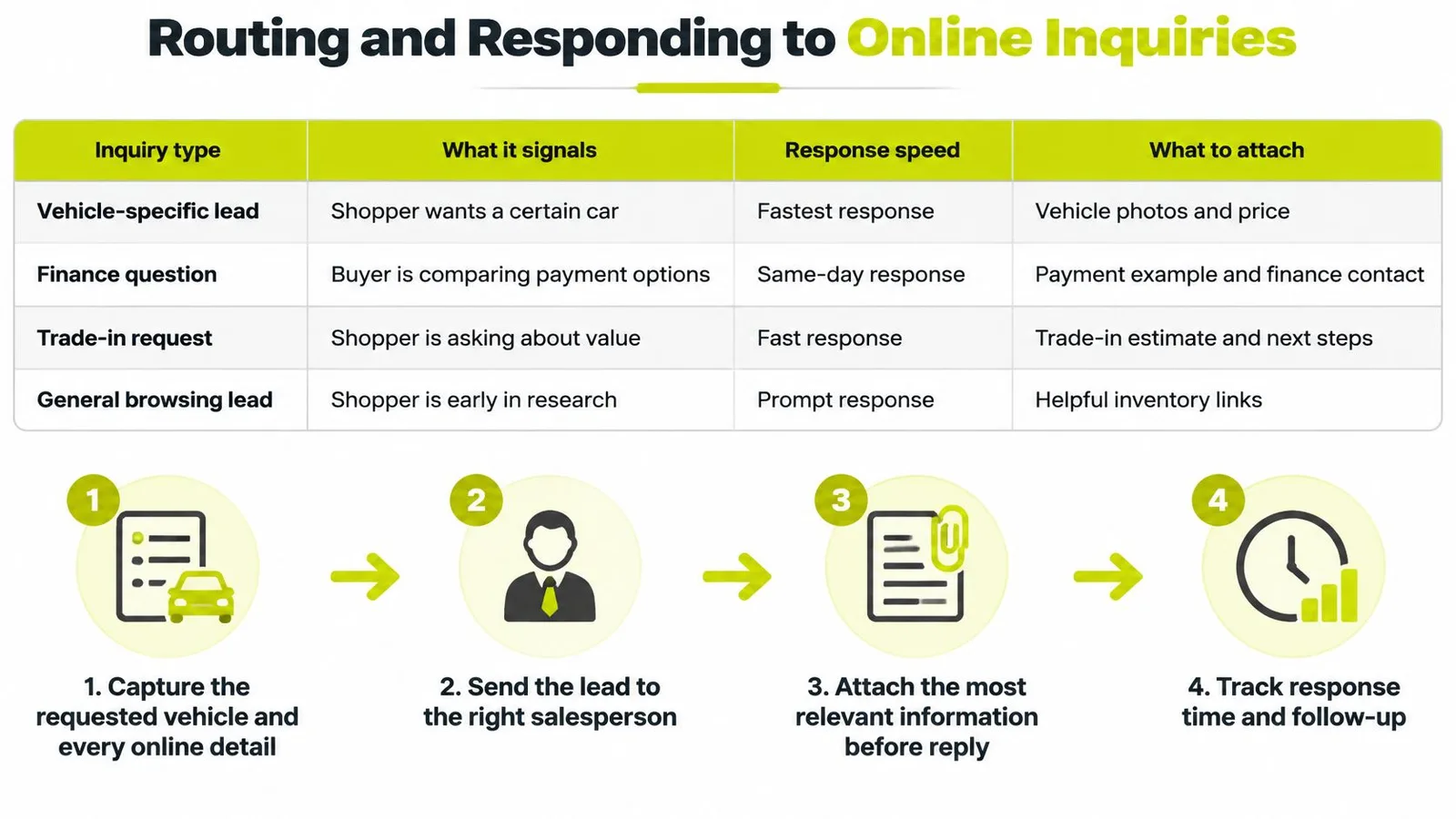
What Each Inquiry Type Tells You
Online inquiry types and response priority
| Inquiry Type | What It Signals | Response Priority | Attach to Record |
|---|---|---|---|
| Test drive or visit request | Near-term buyer | Highest, same day | Preferred time and vehicle |
| Specific vehicle question | Interested in one car | High, within an hour | Vehicle link and stock number |
| Finance prequalification request | Serious buyer weighing payments | High, within an hour | Payment assumptions and down payment |
| Trade-in valuation request | Ready to buy with a car to sell | High, same day | Mileage, condition answers and vehicle details |
| General availability question | Early research | Medium, within one business day | Requested model and budget |
The priorities in that table are working targets you set and enforce, not physics. What isn't negotiable is that a visit request outranks an availability question, and that the record gets the details attached rather than the reply.
The Routing Sequence
- Capture context at arrival. Save the requested vehicle, every tool the shopper completed, the payment they saw and any question they left unanswered. Routing decides whether this becomes lead generation for car sales or lead generation for a CRM nobody opens.
- Assign by priority, not by rotation. The next available rep gets the general question. A finance prequalification goes to whoever can run numbers without a manager standing over them.
- Reply with the car and one question. Confirm the vehicle is available, state the price and fees, then ask a single question such as which afternoon suits them. Two questions get one answer at best.
- Write the shopper's own figures into the record. Term, down payment, trade estimate, rate assumption. The floor will need every one of them within a day.
- Send a personal link. A salesperson can text or email a page for the specific car, or a set of two to six cars when the shopper is clearly comparing. One link, their shortlist, no generic homepage.
Why Digital Leads Carry More Gross
Routing isn't just a service standard, it has a margin effect. Cox Automotive's 2020 lead analysis reported average total gross of $2,328 for digital-retailing leads against $1,865 for traditional leads, a 24.8% difference, with front gross of $910 versus $723 and back gross of $1,418 versus $1,143.
The mechanism is disclosure. Payment, trade-in and finance tools let a shopper self-qualify and reveal purchase intent before a salesperson intervenes, which thins out the low-information inquiries and gives staff something to work with. One caveat worth holding onto: the same analysis reports that shoppers using Cox's digital-retailing solution were five times more likely to submit a lead, with a 46.4% higher close rate and 24% higher gross profit per deal than other lead sources, and those are vendor-reported benchmarks, not universal causal estimates. Confirm them in your own store with identical inventory, response staffing and attribution windows before you move budget.
Carrying Online Work Into the Showroom
Adding tools should remove work. Often it duplicates it. A shopper who prequalifies at 9pm and arrives at 11am the next morning expects the store to already know, and when the desk starts from a blank worksheet the digital process has made the purchase slower, not faster.
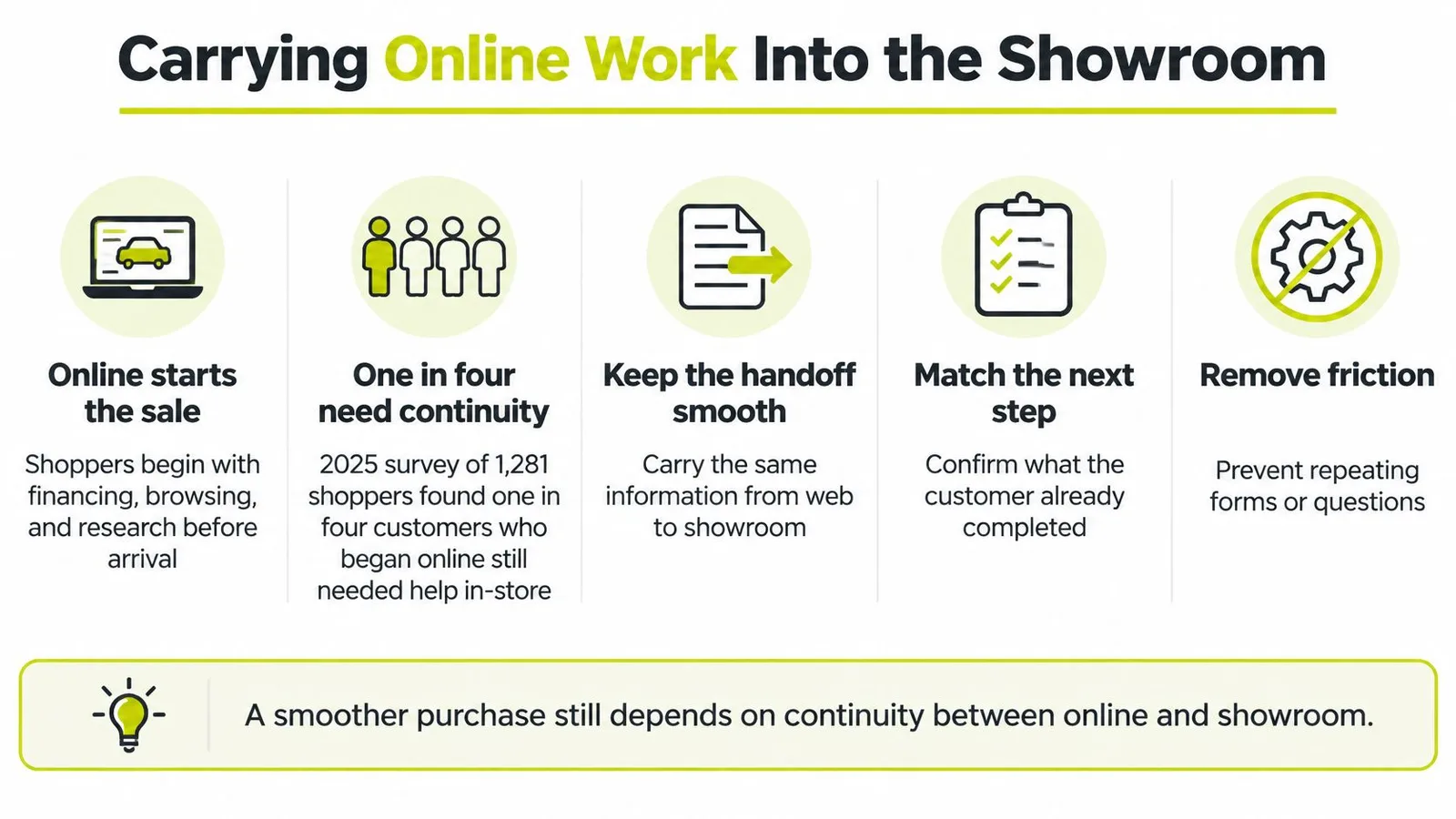
CDK's survey of the online buying experience put a number on the gap: in a 2025 survey of 1,281 shoppers, one in four customers who began online, say by applying for financing or valuing a trade-in, had to restart the process at the dealership because the information didn't transfer or synchronize correctly. The same page cites BCG's survey of more than 160 U.S. dealers, which found that roughly 80% of dealer leads now originate online.
The volume side is settled. Continuity is the open problem.
What Counts as a Transferable Record
The deal desk needs six things on arrival, and any one of them missing sends the customer backwards.
- Identity and consent. Name, mobile, email, and a record of what the shopper agreed to be contacted about.
- The vehicle and its stock number. Not the model they browsed, the exact unit they discussed.
- The trade, marked binding or estimate. A number with no label is a promise in the customer's mind.
- Finance status and payment assumptions. Prequalified or not, plus term, down payment and the rate the online tool used.
- Documents already completed, and where they live. Nothing erodes patience faster than signing the same form twice.
- The online price and fees, with any change labelled. If a figure moved, the shopper should hear it from your staff, not discover it on a worksheet.
Which of those online figures are binding is a policy decision, and it needs to be written down and identical across every rep and every shift.
Explaining a Changed Payment Without Losing Trust
Payments move for ordinary reasons: the lender prices the rate differently, the term changes, an incentive has an expiry date, or the trade appraises lower than the estimate. The damage comes from how the change gets delivered, not from the change itself.
A structure that holds up: state what changed, say why it changed, and put the online assumption next to the new figure. "You were quoted this payment on 60 months at the rate the estimator assumed. Your file came back a tier lower, so the same term is this number. Here are both side by side."
Walk the customer record from the website form through the inquiry system to the deal desk and mark every point where a field disappears. That list of gaps is the fix list, and it's usually shorter than expected.
Measuring Internet Sales by Funnel Stage
Funnel metrics only help when each one points at a cause. Each stage below marks a point where the online record can stall, so a weak signal points to the step that needs an owner.
Funnel stages, weak signals and likely causes
| Funnel Stage | Weak Signal | Likely Cause |
|---|---|---|
| Vehicle page engagement | Many views, few inquiries | Weak photos, missing price or fees |
| Tool completion | Low completion after tools start | Tools hard to find or too long |
| Lead submission | Few leads from high-traffic cars | Unclear calls to action |
| Appointment | Booked but not shown | Slow response or no confirmation |
| Showroom visit | Visits end early | Repeated steps or changed figures |
| Sale | Sales close but margin lags | Weak deal structure or follow-up |
Read one row at a time. A blended number hides the answer: "our internet close rate is 4%" tells you nothing about whether the loss sits in merchandising, response speed or the desk.
Shopper preference explains several of these rows at once. In Cox Automotive's survey of 2,550 in-market shoppers, 83% wanted to complete at least one purchase activity online, 71% wanted online access to deal information such as incentives, trade values and warranties, and 43% wanted to handle financing steps online. A vehicle page that can't answer a payment question, or a deal page that hides the incentives, produces exactly the pattern in row one: views without inquiries.
The same survey also shows shoppers still want staff available at decision points. Fast follow-up wins even when the tools are excellent, because a shopper asking a question has already finished the online work and is waiting on a person.
Segment Before You Conclude
Split every stage by lead source, model line and price band before drawing conclusions. A drop in one segment is a merchandising or staffing story. A drop across all segments is usually a tooling or process story. The mistake is treating a blended number as a diagnosis.
Judging a source on lead count rewards volume and hides contribution. A channel can send the most inquiries in the store and still close below the one sending a third as many, because volume with poor disclosure costs staff time and produces nothing.
The Weekly Review
Block twenty minutes once a week and pull the stage numbers. Track one more figure alongside them that most dashboards ignore: how many times an arriving online customer had to repeat information they already gave. That count tells you whether the digital process is removing work or just relocating it to the showroom floor.
Find the single largest drop from the previous week and assign it to one named owner with a date, not to the team in general. Two drops fixed in a month beats a twelve-tab dashboard nobody reads.
Engagement data shortens that conversation considerably. Knowing when a shopper opens a vehicle link separates a merchandising problem from a follow-up problem, because a timestamp tells you whether the shopper ever got far enough to be interested.
Confirm the Handoff Before Your Next Sales Push
Start with the handoff, not the homepage. Online work is lost at the point where one owner hands a customer to another, so that's the cheapest place to look first.
- Trace three recent online-to-showroom deals. Note every step the customer repeated, from the trade details to the same signature twice. Write the repeats down rather than discussing them.
- Fix the largest break first. A missing fee on the listing, a reply that went out hours late, or a handoff record with no trade value attached. One fix, one owner.
- Put the six-item handoff checklist on the desk. Every arriving online customer gets checked against it before the conversation starts, so a gap surfaces in the first minute rather than the last.
- Review funnel metrics weekly by source. One drop, one owner, one date, measured against the week before.
Record a baseline for each metric before the first fix, or the month-end comparison means nothing. A new dealer can start that baseline cheaply: the first car is free with up to 10 photos and no card required, which is enough to photograph one unit to the standard above and measure the difference in engagement.
At month end, look at three things: fewer repeated steps, faster response times, and a rising share of sold units coming from online sources. If those move together, the workflow is doing its job.
CarShots was built for exactly the front half of this workflow: standardized vehicle photos and walkaround videos from a phone, a Car Page for each unit with pricing, fees, the window sticker and the Buyers Guide, plus share links and engagement tracking so the record travels with the shopper. If your handoff breaks because the listing content isn't there in the first place, visit CarShots and put one car through the process this week.
- car dealership internet sales
- online car sales
- digital retailing
- dealership lead follow-up
- online vehicle merchandising