

On this page
90% of U.S. new-vehicle shoppers preferred actual photographs of a vehicle on a dealer's lot over stock images, according to Kelley Blue Book's shopper research. That makes photography a merchandising decision, not just a cosmetic expense. The right service must show the actual car, get it published efficiently, and preserve the condition details buyers need to make a decision.
Table of Contents
- Why Listing Photos Now Decide Whether Shoppers Call
- The Four Service Models Dealers Use
- How a Phone Shoot Runs From Lot to Listing
- What Monthly Volume Really Costs
- Showing Condition and Disclosing Edits
- Choose Your Photo Model and Test One Lot
Why Listing Photos Now Decide Whether Shoppers Call
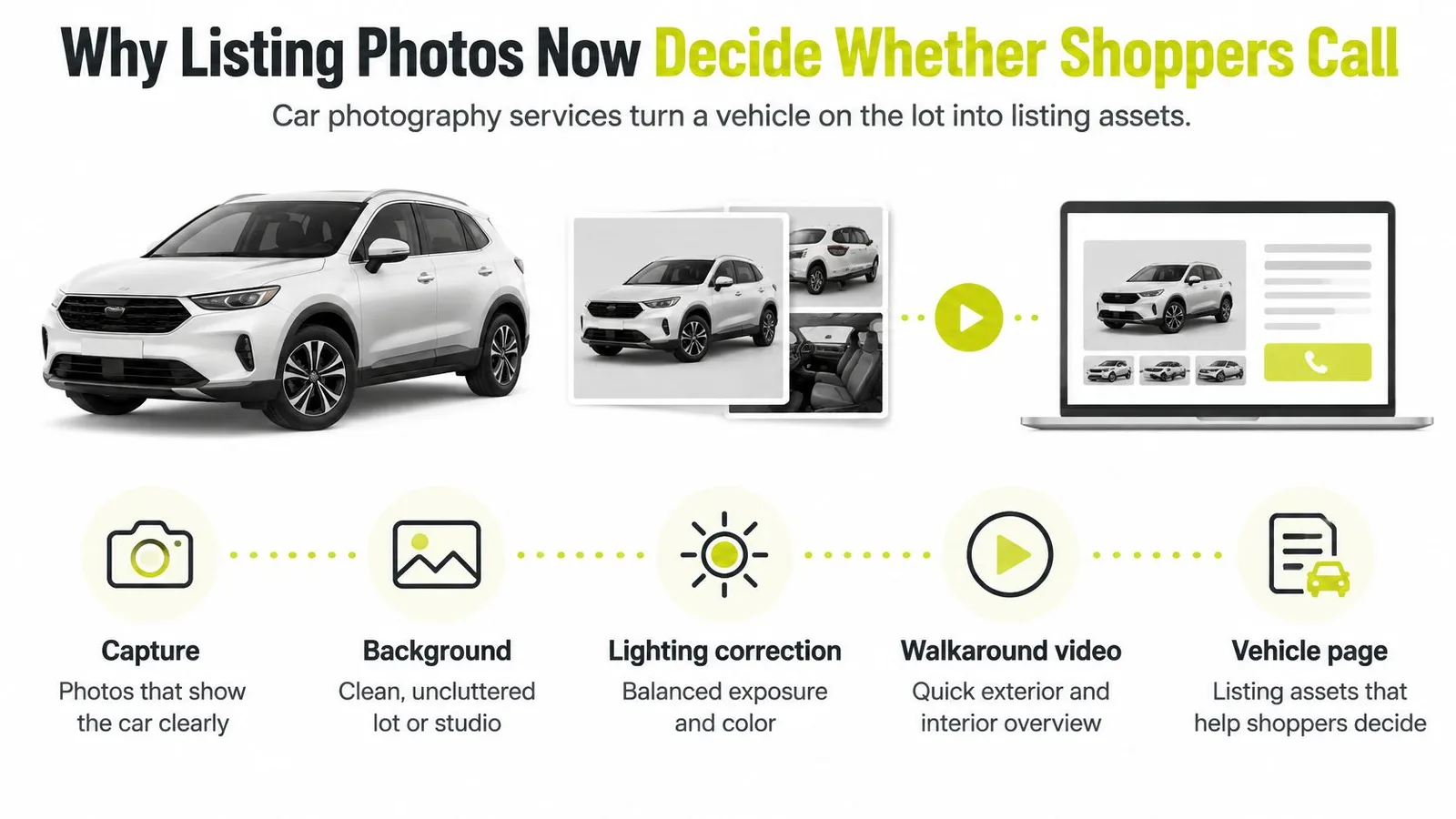
Car photography services turn a vehicle on the lot into listing assets, typically combining capture, background and lighting correction, and delivery to a website or inventory system. Some also provide photo-derived walkaround videos and a dedicated vehicle page.
A listing photograph is the car's first handshake with a shopper. Before calling, buyers need to establish whether they're looking at the right vehicle, whether its condition looks acceptable, and whether the dealer has shown enough to justify a visit.
The service can cover the full path from capture to presentation.
Separate identification from decoration
Stock photography illustrates a model. Actual inventory photographs let shoppers inspect the vehicle you're selling, including its upholstery, wheels, equipment, and visible wear. A polished background can't substitute for those facts.
The operational question is whether your team can produce useful photographs whenever a car becomes ready for sale. A beautiful gallery published after shoppers have already encountered an incomplete listing doesn't solve that problem.
Practical rule: Judge photography by how well a shopper can evaluate the actual car, not by how closely the background resembles an advertising campaign.
Check whether photos are your lead problem
Compare similar vehicles with complete, current galleries against vehicles using stock images or weak photographs. Keep price position, body type, listing age, and availability in view so you don't credit photography for differences caused by the inventory itself.
Track the buyer actions that matter:
- Gallery engagement: Do shoppers open the images and continue through useful detail views?
- Vehicle-detail activity: Do visitors inspect equipment and condition before leaving?
- Visit requests: Do shoppers request appointments or ask for photographs that should already exist?
- Listing readiness: How long does a sale-ready car remain online without its finished gallery?
Repeated requests for odometer, seat-condition, or cargo photographs point to a coverage problem. Consistently weak engagement on poorly framed listings points toward capture quality. Fix the specific failure before buying a more elaborate production setup.
The Four Service Models Dealers Use
Car photography service models compared
| Model | Who captures | Setup needed | Typical turnaround | Cost pattern |
|---|---|---|---|---|
| Outsourced studio or mobile photographer | Hired photographer on site or at a studio | Vehicle transport or scheduled lot visit | Agreed delivery window after the booked session | Per session or per vehicle |
| In-house professional studio | Trained staff with DSLR or mirrorless cameras | Dedicated space, lighting, editing software, optional turntable | Controlled by staff availability and editing workload | Equipment, space, and staff hours |
| Outsourced editing only | Dealer staff with a phone or camera | Upload process for a retouching vendor | Vendor's contracted delivery window and queue | Per image or monthly fee |
| Phone-based capture with automated processing | Dealer staff with a phone in a browser or iOS app | No dedicated booth, lights, or turntable needed | About 20 seconds of processing per photo in our workflow | Monthly subscription plus per-photo packs |
Outsourcing capture fits a dealership that wants a photographer to own composition, lighting, and image selection. It reduces the amount of photographic judgement required from dealership staff, but someone still has to locate cars, retrieve keys, and make the inventory available.
Scheduling is the trade-off. Ask what happens when a vehicle misses the visit, requires a reshoot, or becomes ready immediately after the photographer leaves.
What the equipment budget hides
An in-house studio gives the store control over production timing and lighting. It also requires someone to maintain that standard when the trained employee is absent.
Include floor space, vehicle movement, equipment maintenance, and editing time in the cost calculation. A turntable can simplify positioning, but it isn't a prerequisite for every studio.
Outsourced editing suits teams that can capture consistently but don't want to handle masking, backgrounds, or color correction. It won't repair missing condition evidence or an unreadable instrument cluster. Review the vendor's sample work on your own vehicles, especially dark paint, glass, roof rails, and wheel edges.
When phone capture fits
Phone-based capture moves production closer to the employee who already has access to the vehicle. Our guide to taking car photos without a photographer explains that operating model.
Start with monthly vehicle volume and the number of employees shooting. Then compare each model's cost pattern against that workload. For outsourced services, obtain written per-vehicle or per-image quotes, including travel, reshoots, minimum commitments, and delivery requirements. There isn't a defensible universal rate that makes those quotes interchangeable.
How a Phone Shoot Runs From Lot to Listing
A phone workflow needs a capture standard, not just an employee with a camera. Assign responsibility for moving the car into position, checking the gallery, and confirming that the published images belong to the correct inventory record.
The capture sequence should be simple enough for different employees to follow.
Capture and review before moving the car
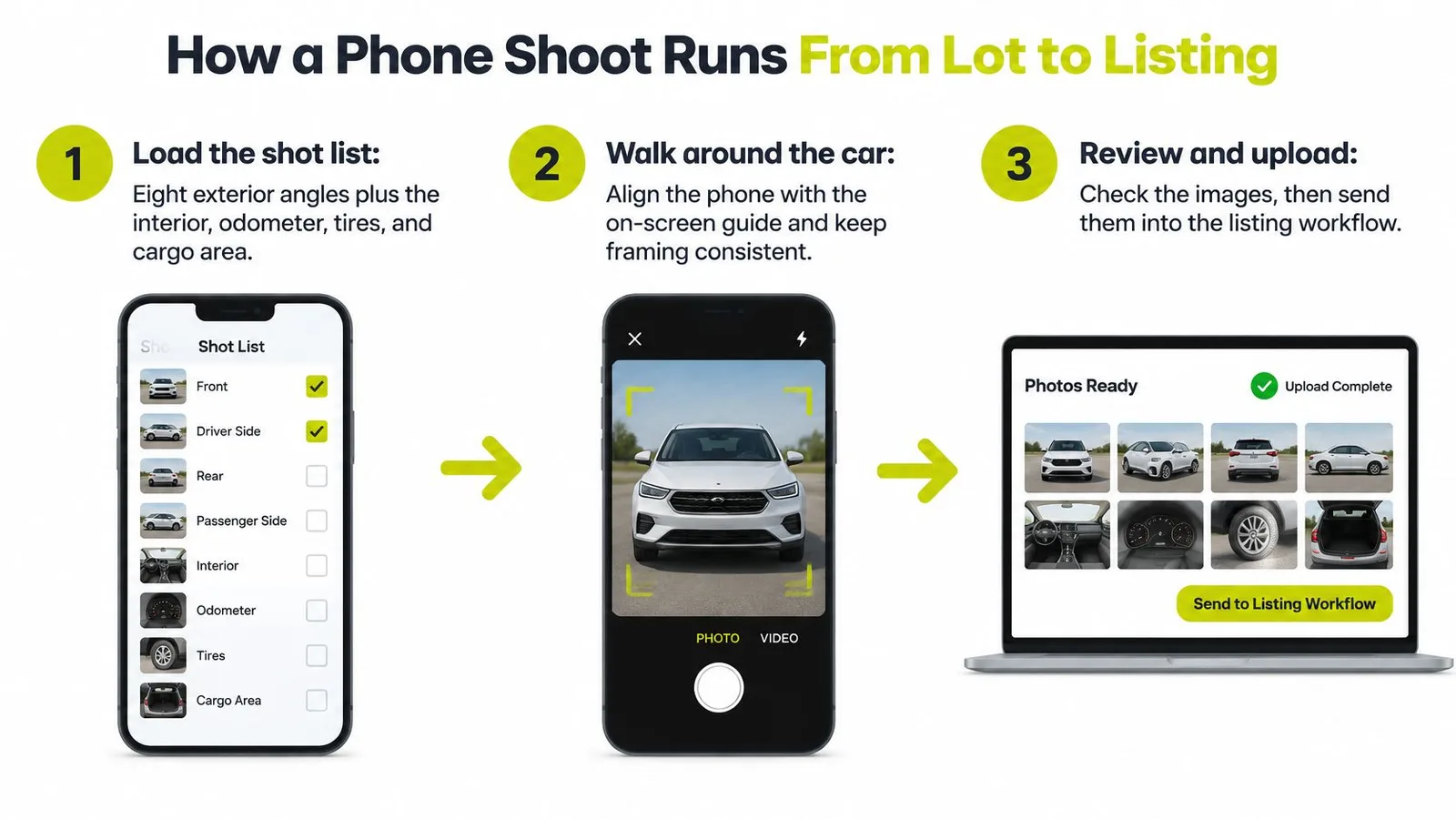
Load the vehicle's shot list. In our guided workflow, dealers walk around the car with their phone, capturing eight exterior angles, the interior, and details such as the odometer, tires, and cargo area. Confirm the inventory record first, because a complete gallery attached to the wrong vehicle is still a failed shoot.
Walk around the vehicle and align the phone with the on-screen positioning outline for each angle. Keep the lens clean, avoid the ultrawide setting for routine exterior views, and leave enough space around mirrors and bumpers so processing doesn't begin with clipped bodywork.
Let uploads continue while you shoot. Processing takes approximately 20 seconds per photograph in our workflow, so staff can capture the next angle rather than watching each image finish. Don't confuse processing time with total labor, which also includes preparation, walking, review, and publication.
Review the complete set before leaving the car. Retake photographs with glare across displays, reflections obscuring damage, cropped wheels, or unreadable mileage; postponing those checks means finding the keys and vehicle again.
Choose a consistent backdrop. Our background replacement applies the chosen scene and corrects lighting while leaving the vehicle itself unchanged, with scene-appropriate contact shadows. Check the result around tires, windows, and mirrors rather than assuming every processed image is ready.
Send the approved gallery through the actual publishing path your store uses, whether that's a download, an inventory feed, or an SFTP transfer. Confirm image order and vehicle matching on the live listing, not merely in the capture tool.
Coverage matters more than repetitive angles
Cox Automotive's Power of Pictures study, which surveyed 521 U.S. consumers who had recently bought or intended to buy a vehicle, found greater engagement with listings containing 40 or more images. That supports a thorough shot list, not filling the gallery with near-duplicates.
Use the additional coverage to answer different questions. Show rear-seat space, cargo access, controls, wheels, upholstery, and vehicle-specific equipment. Used inventory also needs readable wear areas, not only attractive exterior views.
Our dealership inventory photography guide provides a practical reference for organizing capture across staff. Assign a reviewer who can reject a gallery when required views are missing.
Use this workflow demonstration when introducing staff to phone-based capture.
What Monthly Volume Really Costs
The CarShots Monthly plan costs $50 for 333 photos, approximately 15¢ per photo. At a planning allowance of 20 photos per car, that covers about 16 cars monthly. Additional packs provide 67 photos for $10, so the subscription bill rises in steps.
Monthly cost at different lot volumes
| Cars per month | Plan and packs | Approximate monthly cost |
|---|---|---|
| 16 | Base plan only, 333 photos | $50 |
| 20 | Base plan plus 1 pack, 400 photos | $60 |
| 30 | Base plan plus 4 packs, 601 photos | $90 |
| 40 | Base plan plus 7 packs, 802 photos | $120 |
These are subscription calculations at 20 processed photographs per car, not complete production budgets. For example, 30 cars require 600 photos. The base allowance leaves 267 photos uncovered, and four packs add 268, bringing capacity to 601 photos for $90.
Budget for the gallery you actually need
The planning allowance isn't a recommendation to stop photographing once you reach it. For a fuller gallery, calculate at 40 photos per car instead: 16 cars need 640 photos, while the base plan plus five packs supplies 668 photos for $100.
Include condition photographs and reshoots in your forecast. If your store processes every evidence image as well as every presentation image, those files belong in the usage estimate.
The subscription is only the processing bill. Your production cost also includes the people and vehicle movements needed to get an approved gallery online.
Add the labor outside the plan
Use actual recorded time rather than an optimistic estimate from the fastest shooter. Include:
- Vehicle preparation: Retrieving keys, moving blocked inventory, removing temporary paperwork, and checking cleanliness.
- Capture and review: Shooting, checking required details, and retaking unusable images.
- Publishing checks: Confirming vehicle matching, gallery order, and successful delivery.
- Additional assets: Reviewing video output and deciding whether separate filming or specialist detail work is necessary.
Our plan includes photo-derived walkaround videos, but staff still need to approve what shoppers will see. Included software output doesn't make review labor disappear.
Multiply your monthly car count by your intended photographs per car, then add a realistic reshoot allowance based on the pilot. Compare that total and your labor cost with written outsourced quotes before deciding which model is cheaper.
Showing Condition and Disclosing Edits
Polished photographs can help sell the car. A dent the buyer first discovers at the appointment can undo that work.
Condition documentation belongs in the photography purchase decision. A service that produces appealing exterior images but makes it difficult to preserve original evidence is a poor fit for used inventory.
The trust tension is clear: a 2025 CarGurus study reported that 86% of consumers still want to see the vehicle before making a final decision. Your photographs should help buyers arrive informed, rather than needing to discover what the listing omitted.
Maintain presentation images and condition evidence
Use presentation photographs for consistent framing, clean backgrounds, and balanced exposure. Maintain a separate, clearly identified condition evidence set with minimal editing and enough context to locate each issue on the car.
This is the distinction staff should understand before they start shooting.
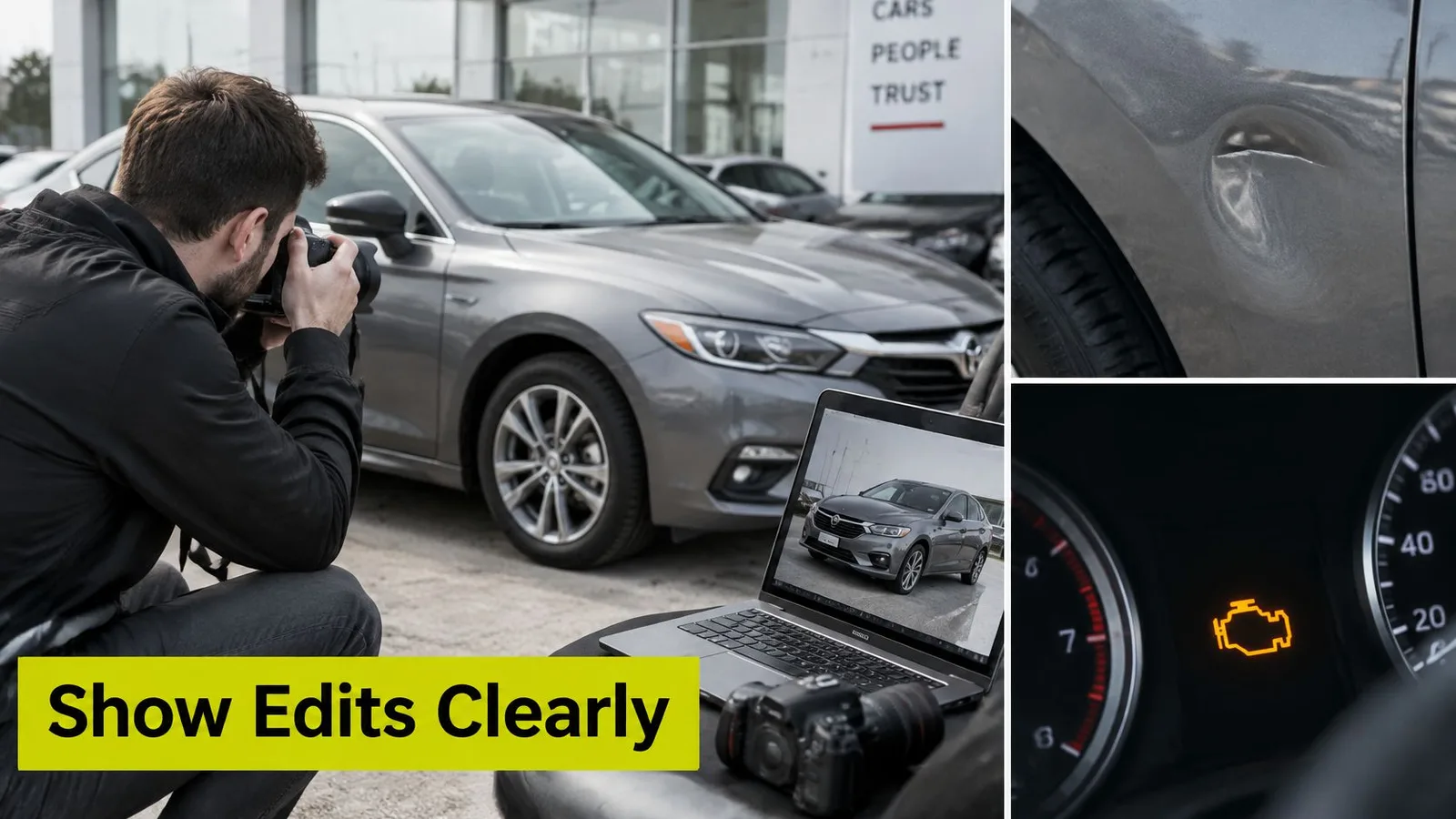
Capture evidence systematically:
- Dents and scratches: Show the affected panel in context, then move closer until the defect is readable. Use angled light when a straight-on view hides shallow damage.
- Stains, tears, and wear: Photograph the seat or trim area, followed by a detail image. Don't use cleaning, dressing, or editing to obscure unrepaired damage.
- Tires and wheels: Show tread at a readable angle and document visible sidewall or rim damage. Don't describe tread as measured unless someone measured it.
- Dashboard indicators and mileage: Capture the odometer clearly. Distinguish normal ignition self-check illumination from warning lights that remain on when the vehicle is running.
- Aftermarket equipment: Show modifications and identify them accurately rather than allowing shoppers to assume they're factory equipment.
- Keys and accessories: Photograph what's included. State known missing items in the listing instead of leaving the buyer to infer completeness.
Retain a capture timestamp and associate the evidence with the VIN in your inventory record. Avoid relying on a folder named only by make and model, especially when similar vehicles are in stock.
Label observations without inventing reassurance
A useful condition caption identifies location, visible issue, and inspection status. For example, a caption could identify a scratch on the passenger-side rear door and direct the shopper to the detail photograph.
Avoid unsupported judgements such as normal wear for mileage. Buyers may interpret that as a condition assessment, even when the employee only meant that wear is visible.
Show where the defect is, show what it looks like, and state what has actually been checked.
If a repair is completed after photography, update the listing and preserve the earlier evidence internally. Don't erase the history by replacing the only record of the issue.
Set an explicit boundary for editing
AI assistance isn't automatically deceptive. Background replacement can preserve the actual vehicle, while removing a scratch changes the factual representation.
Morgan Lewis's automotive advertising guidance warns that AI and CGI visuals can misrepresent features or the consumer's eventual experience and recommends clear, conspicuous disclosure. Treat the following tiers as an operational policy, not a substitute for legal review.
| Editing tier | Treatment | Approval rule |
|---|---|---|
| Routine presentation correction | Background replacement, exposure, white balance, contact shadows, and plate privacy treatment | Vehicle appearance and condition must remain accurate; use a consistent enhancement disclosure |
| Appearance-sensitive correction | Reflection removal or color changes affecting how paint or trim appears | Review against the original; disclose material changes or reject the edit |
| Factual alteration | Removing damage, changing wheels or trim, adding equipment, altering VIN plates or warning indicators | Prohibit in actual inventory listing photographs |
Our photo editor fixes light, color, and license plates on every photo. Your review standard should still verify paint appearance, preserve condition evidence, and ensure plate treatment doesn't cover vehicle details.
The automotive photo editing guide can support staff training, but the store needs its own approval owner. Whoever publishes the listing should be able to compare the processed image with the original capture.
Retain originals, record edits, and flag materially altered regions in the review process. A shopper-facing disclosure such as background enhanced; vehicle condition unaltered describes a defensible boundary, provided the finished photographs meet it.
When evaluating an outside service, make original-file retention and edit accountability contractual requirements. For our workflow, send questions about your intended editing standard to our team and a person replies by email. Don't assume a requested governance feature exists until its availability is confirmed.
Choose Your Photo Model and Test One Lot
Best-fit photography model by dealership situation
| Dealership situation | Best-fit model | Why it fits | Main risk to watch |
|---|---|---|---|
| Single-location used lot with modest monthly volume | Phone-based capture | Low fixed cost without dedicated studio infrastructure | Staff must follow the condition and edit standard |
| Franchised store with several staff shooting | Phone-based capture with a shared shot list | Standardizes capture across employees and locations | Employees may skip required views |
| High-volume store with specialty or luxury inventory | In-house studio or outsourced studio | Greater control over lighting and specialist detail work | Dedicated capacity can be underused or become a bottleneck |
| Dealer needing campaign-grade hero images | Outsourced studio | Specialist lighting and creative production | Scheduling, transport, and separately quoted production costs |
The best-fit model is a starting recommendation, not a purchasing verdict. A phone workflow can fail if nobody owns review, while a well-run outsourced service can justify its cost by removing work your employees aren't equipped to manage.
Run a controlled lot test
Use a pilot broad enough to expose your operational problems. A workable example is ten cars across different price points and body types, followed over 30 days; that's a proposed test design, not a performance benchmark.
- Select representative inventory. Include vehicles with difficult paint, large interiors, and visible wear, not just freshly detailed cars that photograph easily.
- Shoot with the same required coverage and record total staff time per vehicle, including preparation and reshoots.
- Test publication end to end. In our settings, configure CSV or XML feeds or SFTP uploads, or download individual images and whole-car ZIP files. Confirm receiving-system compatibility; this isn't an API or direct DMS integration.
- Compare detail-page views, lead requests, and time to publish during the test. Record shopper requests for missing photographs and any condition surprises raised at appointments.
Our free first-car trial includes up to 10 photos with no card required. Use it to assess capture and image handling, not as a substitute for testing a complete listing gallery.
Choose the model whose monthly cost, turnaround, and condition standard all pass. If any fails, change the process before expanding it across the dealership.
CarShots offers guided phone capture, background and lighting processing, walkaround videos, and vehicle pages for dealership inventory. Visit CarShots to try your first car free, then test the finished images against your publishing workflow and condition-documentation standard before committing to a wider rollout.
- car photography services
- dealership car photos
- vehicle listing photos
- in-house car photography
- phone car photos